
Newsletter visuals
This is the template the newsletter desk and Antigravity use for every chart and diagram in an issue. Antigravity proposed it during issue 28, over four rounds with the desk, and the desk edited it. Issue 28’s seven visuals were the first made to it. The example SVGs at the end use placeholder numbers, except where they repeat issue 28’s.
0. How a visual gets made
Section titled “0. How a visual gets made”-
The desk brief comes first. For each issue, the Editor writes:
- what the issue says;
- which points earn a visual, and in what order;
- anything a visual must not claim.
The brief cites this template instead of restating it.
-
Antigravity designs. The issue’s ticket carries an open visuals brief. Antigravity picks the form for each point, or proposes a better one with its reason. It gives the script or count behind every number (section 8).
-
The desk checks every visual before it reaches an issue:
- render it at about 777 px wide on a dark page, with headless Edge (
msedge --headless --screenshot); - check for clipping and overlaps;
- recount every number from the source files with its own script, not Antigravity’s;
- open every quoted line at its path.
- render it at about 777 px wide on a dark page, with headless Edge (
-
The desk’s verdict on each visual is use, revise with a specific ask, or cut.
- The desk may make small layout fixes itself, such as a clipped line or an overlapping label.
- Anything that changes a number or a claim goes back to Antigravity.
-
Files are never deleted between rounds. Approved versions are kept. New ones get a new name or a
-vNsuffix, so nothing the desk passed can vanish. -
Placement:
- Files: charts go in
site/public/charts/issue-NN-<name>.svgand are referenced as/rnd/charts/....- Never put a word in a filename that the repo’s pre-push check reads as private (
blind,hidden,private,secret,sealed,gold). For example,graded-panel, notblind-panel.
- Never put a word in a filename that the repo’s pre-push check reads as private (
- Email copies: run
python scripts/render_chart_pngs.pyfromsite/after adding or editing a chart, and commit the PNG andcharts/png-manifest.jsonwith it.- The feed, which is also the email edition, shows the PNG, because Gmail and Outlook don’t show SVG.
- CI fails a pull request whose chart has no current PNG.
- Alt text: every image’s alt text carries its numbers in a plain sentence, so a screen reader, or a feed reader with images off, loses nothing. Antigravity drafts the alt text alongside each SVG, and the desk checks it.
- Files: charts go in
-
Then the usual path: an Antigravity review of the placed issue, the Director’s go, then the Publisher.
A table is better than a chart when:
- the reader needs to look up exact values across rows (the cost tables);
- there are only two numbers;
- the point is the numbers themselves, not their shape.
A visual has to explain something the text and a table can’t. If it only decorates, it’s cut.
1. Canvas and margins
Section titled “1. Canvas and margins”-
Canvas width:
viewBox="0 0 688 <H>".<H>is between 210 and 340, sized to fit the content without vertical crowding.- The page renders newsletter charts at roughly 777 px wide on a dark shell.
-
Background: always start with a full-bleed solid white rectangle, so the chart reads cleanly on a dark page:
<rect width="688" height="<H>" fill="#ffffff"/>Never use cream (
#fbfaf7), a transparent background, or drop shadows. -
Outer margins:
- Left and right: keep all text and shapes at least 24 px inside the edges, so
xstays within 24..664. - Top and bottom: put the title baseline at
y="32"toy="40", and the footnote baseline at least 20 px above<H>.
- Left and right: keep all text and shapes at least 24 px inside the edges, so
-
Inner padding: every
<text>inside a bordered card or<rect>keeps at least 10–12 px from the box’s left and right borders. Wrap a long phrase across two<text>lines rather than letting a line approach the edge. -
Check the geometry and palette before handing a visual over. Run a script that parses the SVG and checks:
- every
#rrggbbcolour is one of the six in section 2; - every
<text>’s estimated span stays withinx= 24..664, and at least 4 px inside any<rect>that contains it. Estimate the span aslen(text) * font_size * 0.55, adjusted fortext-anchor.
The desk’s dark-page render still follows. The script catches the mechanical errors first.
- every
-
Accessibility: every
<svg>root carriesrole="img"and a plain-Englisharia-labeldescribing what the chart shows. It’s paired with a proposed alt sentence that states every number in the chart.
2. Palette and colour roles
Section titled “2. Palette and colour roles”Use only the six house colours below. Don’t introduce amber, blue, off-white card fills or custom border tints.
| Hex | Role | Where to use |
|---|---|---|
#ffffff |
Canvas and inverse text | The canvas background, card fills, and text inside solid #2f7d5b, #b4532a or #8a8f98 shapes. |
#2f7d5b |
Match, sound, target | Items that match the target lesson (T10), byte-identical replies, sound graded-panel items, accepted controls, stable label boxes. |
#b4532a |
Drift, flip, refusal | Off-target trait votes (T14), verdict flips, false refusals, contradictory instructions, ambiguous graded-panel items. |
#8a8f98 |
Neutral, baseline, noise | Neutral connectors, “no majority” boxes, single-run sampling noise, stable comparison bars set against flips. |
#1f2430 |
Primary ink | Titles, section headings, axis and row labels, primary counts. For a faint bar track behind a numerator bar, use fill="#1f2430" opacity="0.10". |
#5b6272 |
Secondary ink | Subtitles, explanatory captions inside cards, footnotes. |
3. Typography and type sizes
Section titled “3. Typography and type sizes”- Font stack: set
font-family="system-ui, sans-serif" font-size="14"on the<svg>root. Never embed web fonts. - Sizes:
- Chart title:
font-size="15" font-weight="600" fill="#1f2430". - Section or card heading:
font-size="13"(or 12.5),font-weight="600". - Row labels and primary values: 12 to 14. Use
font-weight="600"for key counts or emphasis, and normal weight for labels. - Subtitles, legend labels and footnotes: 12. Use
fill="#5b6272"for subtitles and footnotes, andfill="#1f2430"for legend entries. - Compact card text: 11 to 11.5, never smaller than 11 px.
- Chart title:
4. Title and subtitle
Section titled “4. Title and subtitle”- A title that explains itself. It states what the chart shows in one plain sentence, centred
(
text-anchor="middle" x="344" y="32") or left-aligned atx="24". For example: “Where the critic wobbles across two runs of 102 Track A items”. - An optional subtitle (
y="52",font-size="12",fill="#5b6272"). It names the denominator and the setup in plain words. For example: “Two runs with the same verdict prompt: 95 items stayed the same, 7 flipped”. - A footnote (
font-size="12",fill="#5b6272"). It explains how to read the visual in one line. For example: “Each box is one slot; its colour is the majority of the critic’s three trait votes.”
5. The five standard forms
Section titled “5. The five standard forms”5.1. Bar share
Section titled “5.1. Bar share”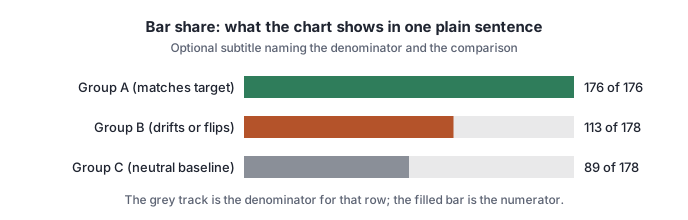
- When it fits: comparing proportions or counts against a known denominator across 2 to 6 groups. Examples are byte-identical reply shares across GPUs in issue 27, and the 23 sound vs 7 ambiguous split in issue 28.
- When it doesn’t: a single two-number split that needs no breakdown stays a two-column table.
- Structure:
- a group label, left-aligned or right-anchored (
text-anchor="end"); - a full-denominator track (
fill="#1f2430" opacity="0.10", height 20 to 22); - the numerator bar, in
#2f7d5b,#b4532aor#8a8f98; - the exact count (“113 of 178”) to the right of the track.
- a group label, left-aligned or right-anchored (
5.2. Three-label line
Section titled “5.2. Three-label line”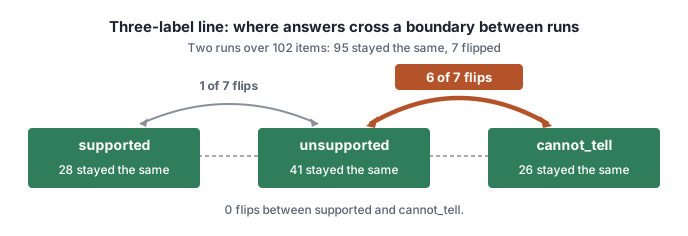
- When it fits: showing stability, and run-to-run moves, across a small closed set of categories (
supported,unsupported,cannot_tell), so the reader sees at a glance which boundary is porous. - Structure:
- three category boxes along a horizontal baseline, in
#2f7d5b, each showing its stable count; - arcs above the line (
<path d="M … Q …"/>) carrying the flip counts, in#b4532afor the main boundary and#8a8f98for minor noise.
- three category boxes along a horizontal baseline, in
5.3. Slot grid
Section titled “5.3. Slot grid”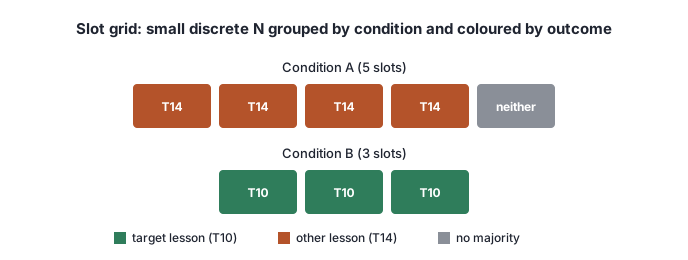
- When it fits: a small number of discrete items (about 5 to 20, such as the 12
cannot_tellslots in a writing wave), grouped by planned condition and coloured by outcome:#2f7d5bfor target;#b4532afor drift;#8a8f98for no majority.
- Structure: centred rows of uniform rounded boxes (
width="78" height="44" rx="4", with 8 px gaps) under each condition heading, then a three-swatch legend and a one-line footnote.
5.4. Process map
Section titled “5.4. Process map”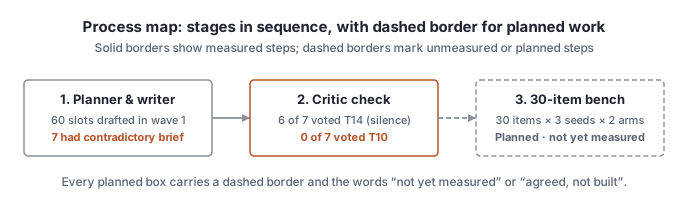
- When it fits: explaining a pipeline (planner → writer → critic → refusal), or how two instructions collide to produce an observed outcome.
- Structure:
- 3 to 4 boxes, left to right, joined by
<line>and<polygon>arrowheads; #8a8f98for neutral flow,#b4532afor a colliding or failing path;- 3 to 4 short lines of text in each box, at most 32 characters per line.
- 3 to 4 boxes, left to right, joined by
5.5. Ranking coverage
Section titled “5.5. Ranking coverage”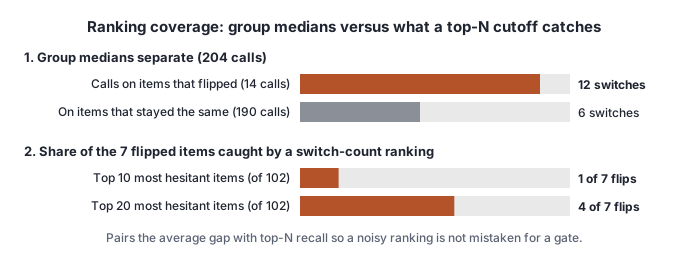
- When it fits: a metric separates groups on average (such as median hesitation switches), but a top-K ranking still misses most targets, because stable, noisy items crowd the top of the list.
- Structure: two parts on one canvas.
- Top: the group medians as horizontal bars (12 vs 6 switches, 13.5 vs 3 switches).
- Bottom: the share of target cases caught at practical cutoffs (“Top 10 catches 1 of 7 flips”, “Top 20 catches
4 of 7 flips”), against a full-denominator track (
width="270"for 7 of 7).
6. Measured vs planned
Section titled “6. Measured vs planned”- Measured results are drawn with solid fills (
#2f7d5b,#b4532a,#8a8f98) and solid borders (stroke-width="1.5"). - Planned or unmeasured work is never drawn with solid bars that could be mistaken for data. Mark any planned stage
with both of these:
- A dashed border and connector:
stroke="#8a8f98" stroke-width="1.5" stroke-dasharray="5,3"andfill="#ffffff". - Status words inside or beneath the box: Planned · not yet measured or Agreed, not built. Stage 3 of the process map example shows how.
- A dashed border and connector:
7. IDs and jargon
Section titled “7. IDs and jargon”- Use the issue’s words, not internal shorthand. A chart may use only terms the issue’s text defines for the
reader, such as
supported,unsupported,cannot_tell,T10,T14,Track A,intact items,soundandambiguous. - Kept out of charts unless the issue’s text names them:
- run or window codes (
15f,17n); - source filenames and line numbers (
prompts.py:256); - internal function or check names;
- panel or item IDs (
P01–P30). Name an example item in plain words instead (“the payroll-portal item”), except in a slot grid where the issue maps the slots.
- run or window codes (
- Gloss
T10andT14in a word or two on the same canvas whenever they appear (“T10, the trait the slot was for” / “T14, a different trait (silence)”).
8. The numbers rule
Section titled “8. The numbers rule”- Every number in a visual comes from a file opened in the current session, backed by the exact script or count that produced it.
- No proxy counts, and no lumped
Nonerows:- every number on a card counts exactly what the card names. An ambiguous-item count, for example, never goes on a card about right refusals;
- when counting rows by a field (
verdict,side,class), print the fullcollections.Counter,Nonekeys included, so rows the field doesn’t apply to are never lumped into a category.
- In the review reply, list for each SVG:
- every number shown in it;
- the file it came from, with line numbers for small files;
- the command or count behind it;
- the output of a check, run after writing, confirming that every quoted string and
path:linein the reply exists verbatim on disk.
- Anything not opened in the current session is marked “not checked” and never placed in a chart.
9. Example SVGs
Section titled “9. Example SVGs”The five examples above are in site/public/handbook/visuals/:
bar-share.svg: horizontal bar shares against grey denominator tracks.three-label-line.svg: three verdict stations with flip arcs above the line.slot-grid.svg: slot boxes grouped by planned condition and coloured by trait vote.process-map.svg: a left-to-right pipeline with solid measured stages and a dashed planned stage.ranking-coverage.svg: group medians paired with top-10 and top-20 coverage bars.